Snapchat Video Downloader — Save Any Snap in HD for Free
Snapchat is one of the world's fastest-growing social media platforms, with over 400 million daily active users sharing Spotlight videos, public Stories, creative Snaps, and short-form Reels every single day. While Snapchat is designed around the idea of disappearing content, many public videos are worth keeping — whether you created them yourself, discovered an inspiring clip, or want to share something across other platforms.
Snap HDDown is the fastest, cleanest, and most capable free Snapchat video downloader available today. Paste any public Snapchat link — Spotlight, Story, Reel, or Photo — and download the original HD file directly to your device in under 3 seconds. No account. No watermark. No hidden fees. No limits.
How to Download Snapchat Videos in 3 Easy Steps
Downloading a Snapchat video with Snap HDDown takes less than 30 seconds from start to finish. Here's exactly what to do:
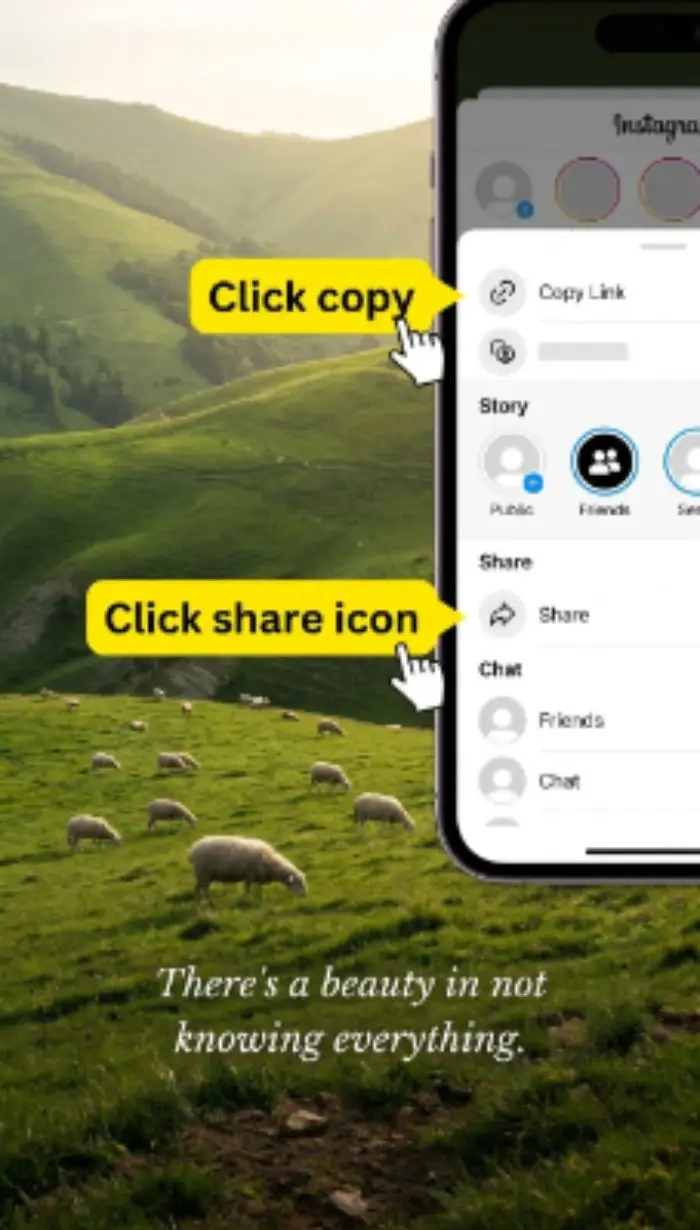
Copy the Link
Open Snapchat and find any public Spotlight video or Story. Tap the Share button and select Copy Link. On desktop, copy the URL from your browser address bar.
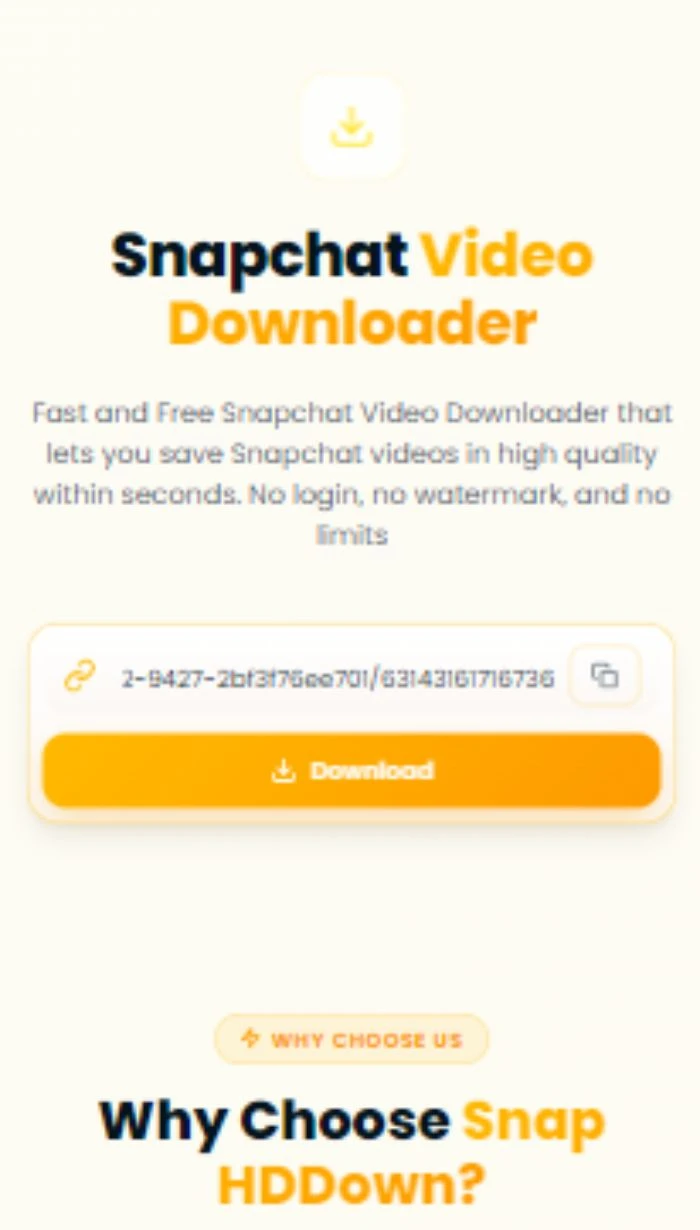
Paste & Download
Paste the link into the input field above and tap the Download button. Our server resolves the media URL instantly — usually within 2–3 seconds.
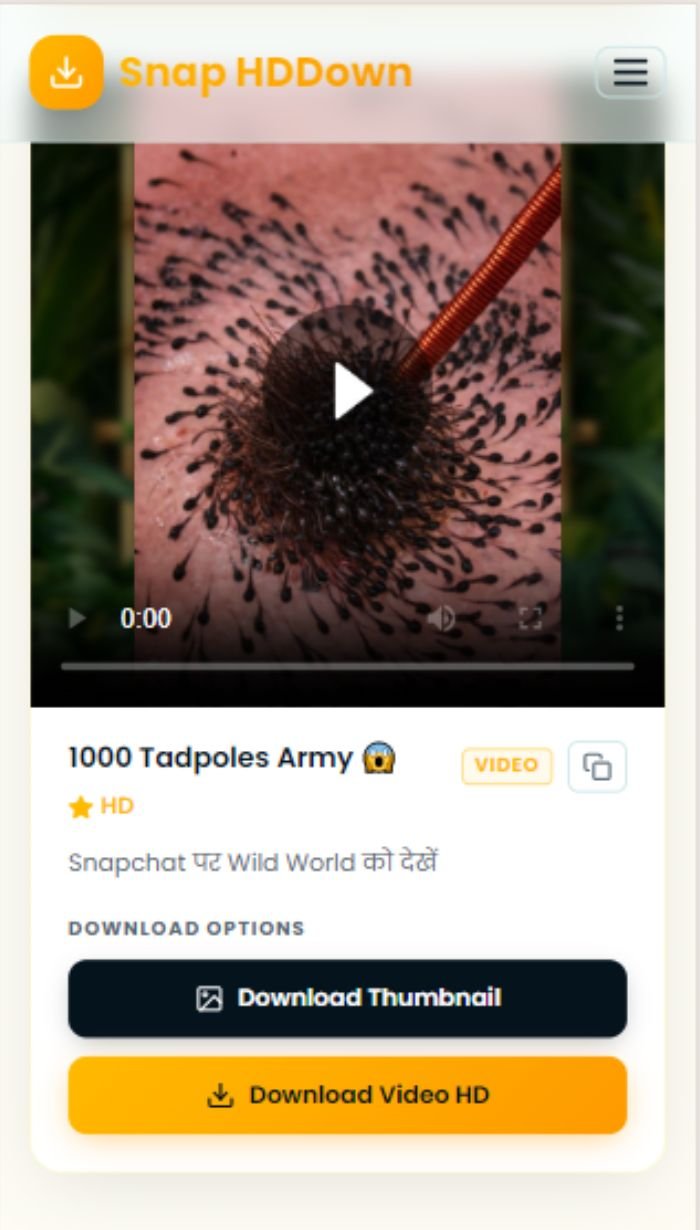
Save in HD
Preview the video, then tap Download Video HD to save the original file to your device. Zero watermarks, zero compression.
Tap the clipboard icon next to the input field to instantly auto-paste your copied link — no manual typing required.
Complete Feature Breakdown
Snap HDDown is purpose-built to outperform every other Snapchat downloader. Here's a detailed look at what sets it apart:
Lightning-Fast Processing
Our backend resolves Snapchat media URLs server-side. From paste to download-ready, the average time is under 3 seconds — even on mobile data.
Zero Watermarks
We never encode our branding or any overlay onto downloaded files. What you get is the exact, original file Snapchat serves from its CDN — completely clean.
No Login Required
We don't collect email addresses, phone numbers, or any personal information. There's no account system — just the tool, ready the moment you arrive.
Inline Video Preview
Before saving anything, the video plays right inside the result card. Confirm it's the right clip before committing to download — no surprises.
Thumbnail Download
Every result includes a one-click thumbnail download. Save the cover image separately — ideal for blog posts, social previews, or video editing.
Direct Link Copy
Copy the raw CDN URL to your clipboard for use in download managers, scripts, or anywhere else you need the direct source link.
All Supported Snapchat Content Types
Snap HDDown handles every category of public Snapchat content. Use the dedicated pages for format-specific tips and optimized download flows:
Spotlight Videos
Snapchat's viral short-form video feed. Public by design. Download any Spotlight clip in full HD.
Spotlight DownloaderPublic Stories
Creator and brand Stories shared publicly. Save individual Snaps or full story collections.
Stories DownloaderReels & Clips
Short vertical video content from creator profiles and discovery feeds.
Reels DownloaderProfile Photos (DP)
Full-resolution display pictures from public Snapchat user profiles.
DP DownloaderVideo Thumbnails
Cover frames from any supported video — saved as a clean JPEG image file.
Main DownloaderHow to Save on Every Device
The download process is identical across all devices — but the final save step differs slightly by operating system. Here's the complete guide:
- Paste the link and tap Download
- Long-press the video in the result card
- Tap Save Video from the pop-up menu
- Video saved to Photos → Recents
- Paste the link and tap Download
- Tap the Download Video HD button
- Allow downloads when browser prompts
- File appears in Downloads / Gallery
- Paste the link and click Download
- Click Download Video HD
- Browser saves MP4 to Downloads folder
- Open with VLC, QuickTime, or Windows Media
Why People Download Snapchat Videos
Snapchat built its platform around ephemeral content — but the reality is that public, creator-shared videos often deserve a longer life. Here are the most common reasons people use a Snapchat downloader:
Content Archiving
Creators regularly lose access to their own Spotlight videos once they leave the public feed. Downloading your own content before it disappears is smart digital housekeeping.
Research & Journalism
Journalists, academics, and marketers track viral trends by saving clips for offline analysis, fact-checking, or use as reference material in reports and publications.
Cross-Platform Sharing
Snapchat links don't embed natively in WhatsApp, Telegram, Discord, or email. Downloading the file first lets you share it anywhere, on any platform, in any format.
Offline Viewing
Downloaded videos play without an internet connection — ideal for flights, commutes, remote travel, or anywhere you want to save mobile data.
Video Editing & Remixes
Content creators download source clips to cut, react to, add commentary, or create compilation videos — always with proper credit to the original creator.
Personal Memories
Public Stories sometimes capture events you attended — concerts, sports games, community moments. Saving them is a natural way to preserve those memories.
Privacy, Safety & Responsible Use
We take both your privacy and creator rights seriously. Here is exactly how Snap HDDown handles your data — and your responsibility as a downloader.
Our Commitments to You
Your Responsibility
Troubleshooting Common Issues
Most problems have a simple fix. Here's a complete reference for everything that can go wrong and how to resolve it:
Content is private, account is private, snap expired, or link is region-restricted. Open the URL in an incognito window — if it won't load there without login, our tool can't fetch it either.
Your browser may be blocking the download. Check browser download permissions for this site. On iOS Safari, long-press the video player and choose Save Video.
Snapchat encodes video in H.264 MP4. If your player doesn't support it, try VLC — it plays every codec and is free on all platforms.
Speed depends on Snapchat's CDN, not our servers. Copy the direct link from the result card and use a dedicated download manager for multi-threaded, resumable transfers.
You may have pasted a profile URL instead of a specific video link. Share the link from the specific snap — not from the user's profile page.
Ensure you're on a modern browser — Chrome 90+, Safari 15+, or Firefox 90+. Older versions don't support the clipboard API or inline video playback. Update your browser first.
Frequently Asked Questions
Everything you need to know about downloading Snapchat videos with Snap HDDown:
Pro Tips for the Best Download Experience
Use the Full Expanded URL
Short share links from SMS or DMs may not resolve correctly. Open the link in a browser first so it expands to the full snapchat.com/… URL, then copy that.
Download While It's Live
Some Spotlight videos rotate off the public feed quickly. If you spot a clip you want, download it promptly rather than bookmarking for later.
Test Links in Incognito
Before pasting, open the Snapchat link in a private/incognito browser window without logging in. If the content loads, Snap HDDown can fetch it.
Always Save the Thumbnail
The thumbnail download button saves the cover image as a clean JPEG — far more useful than manually screenshotting a frame from the video.
Use Download Manager for Large Files
For slow connections, copy the direct CDN link and paste it into a download manager app. These tools support resumable, multi-threaded downloads.
Bookmark Your Favourite Page
If you regularly download a specific content type, bookmark that dedicated page — each one is streamlined for its format with relevant tips and examples.
Ready to Download Your First Snapchat Video?
Scroll to the top, paste your link, and save in HD — free, instant, zero watermark. No account needed, no limits, no catch.