Snapchat Photo Downloader
Still images shared publicly on Snapchat are some of the most vibrant, authentic mobile photography on the internet — captured in the moment, posted without heavy post-processing, and displayed in formats optimised for the modern smartphone screen. Whether it is a breathtaking travel shot in a creator's public Story, a brand campaign image on a business profile, or a beautifully composed photo Snap shared via a public link, Snap HDDown's Snapchat Photo Downloader gives you the original full-resolution JPEG straight from Snapchat's servers — no watermark, no quality loss, no account required.
Screenshotting is the obvious alternative — but screenshots introduce the display's pixel density into the equation, crop the image slightly on most devices, and capture your status bar, notification badges, and anything else overlapping the screen at that moment. The downloaded file from this tool is the raw image Snapchat actually stores: every original pixel, at the full resolution the photographer uploaded, as a clean JPEG file ready for editing, sharing, or archiving.
What Are Public Snapchat Photos?
Snapchat launched as a disappearing-photo platform — but a large category of its image content has always been publicly shareable. Public Snapchat photos include still images posted to public Stories, cover images attached to Spotlight clips, photo Snaps shared via a publicly accessible link, and images displayed on creator and brand profile pages. These photos don't disappear — they remain accessible to anyone with the link and are indexed by Snapchat's own web viewer.
What distinguishes Snapchat photography from other platforms is the capture-first philosophy: the camera opens the moment you launch the app, encouraging spontaneous, unfiltered photography rather than the curated grid-building approach of Instagram. This results in genuinely authentic mobile photography — real lighting, real moments, real scenes — that photographers, journalists, brands, and researchers often want to preserve in its original quality.
Unlike video content, photos are immediately usable across the widest range of applications: article illustrations, moodboard references, design inspiration, social media posts, presentations, and personal archives. A downloaded Snapchat photo is a standard JPEG or PNG — it opens in every image viewer, imports into every editor, and uploads to every platform without any format conversion step.
A screenshot captures your display at screen resolution — typically 72–96 PPI, with UI elements overlapping the image. A downloaded Snapchat photo is the original file at full upload resolution, which is commonly 12–50 megapixels on modern smartphones. For any use beyond casual sharing, the downloaded file is dramatically superior.
How to Download a Snapchat Photo — 3 Steps
The entire process takes about ten seconds from opening this page to having the photo in your camera roll or downloads folder. No extensions, no installs, no accounts:
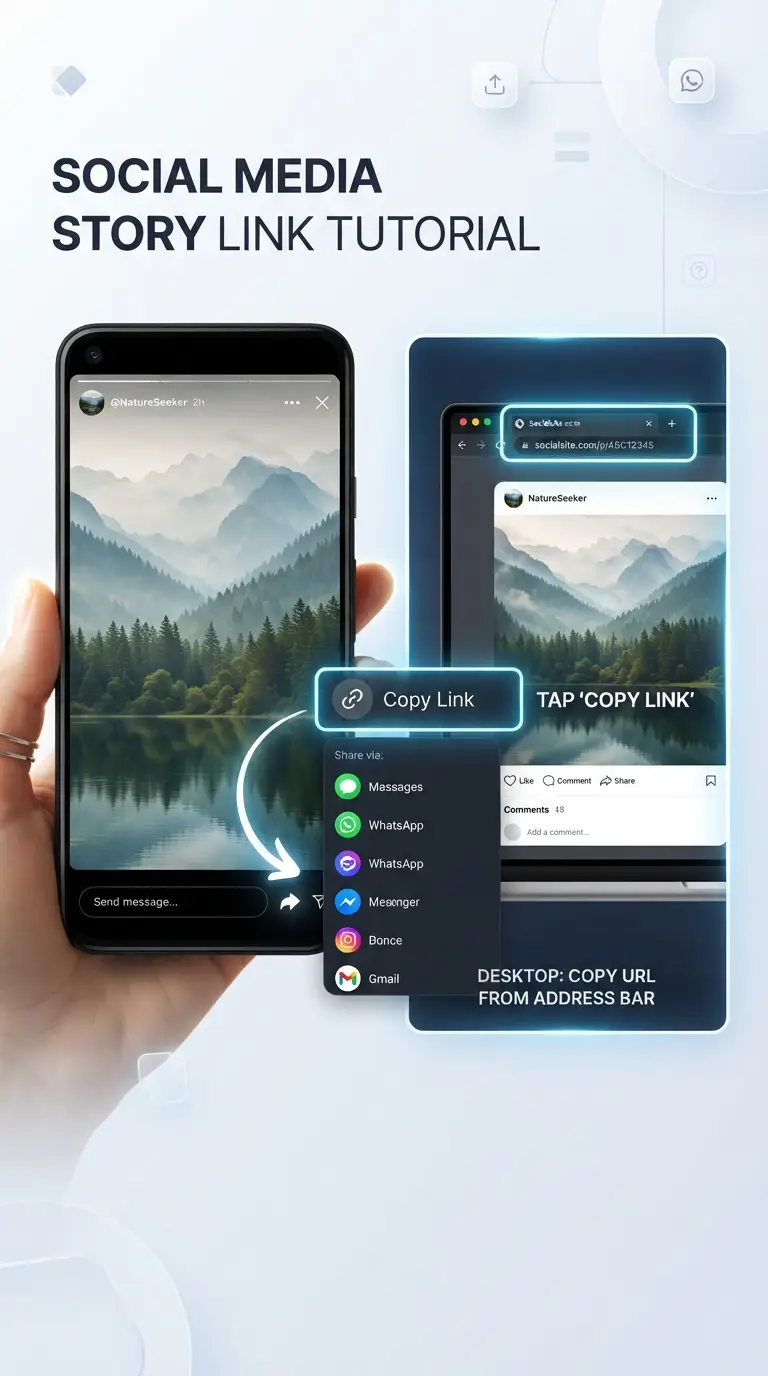
Find & Copy the Photo Link
In the Snapchat app, open a public Story or Spotlight photo and tap the Share arrow → Copy Link. On the Snapchat website, simply copy the photo's URL from your browser address bar.
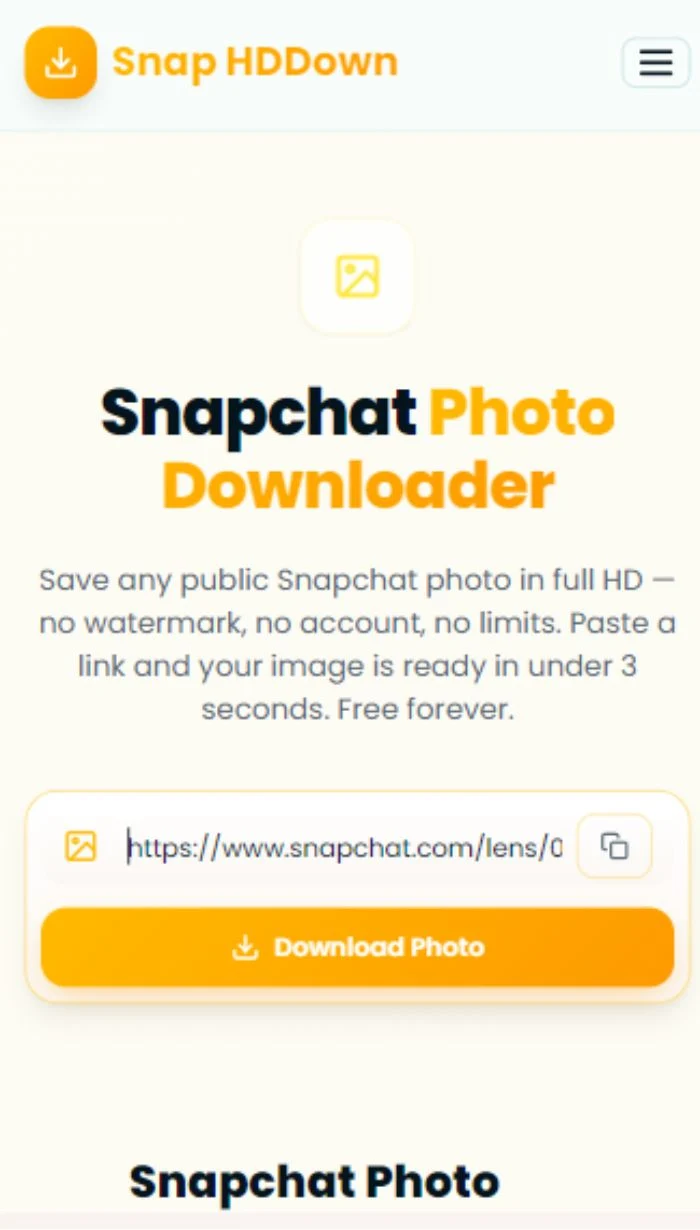
Paste & Process
Paste the link into the field above — or tap the clipboard icon to auto-paste from your last copy. Hit Download Photo and our server resolves the full-resolution CDN image URL in real time.
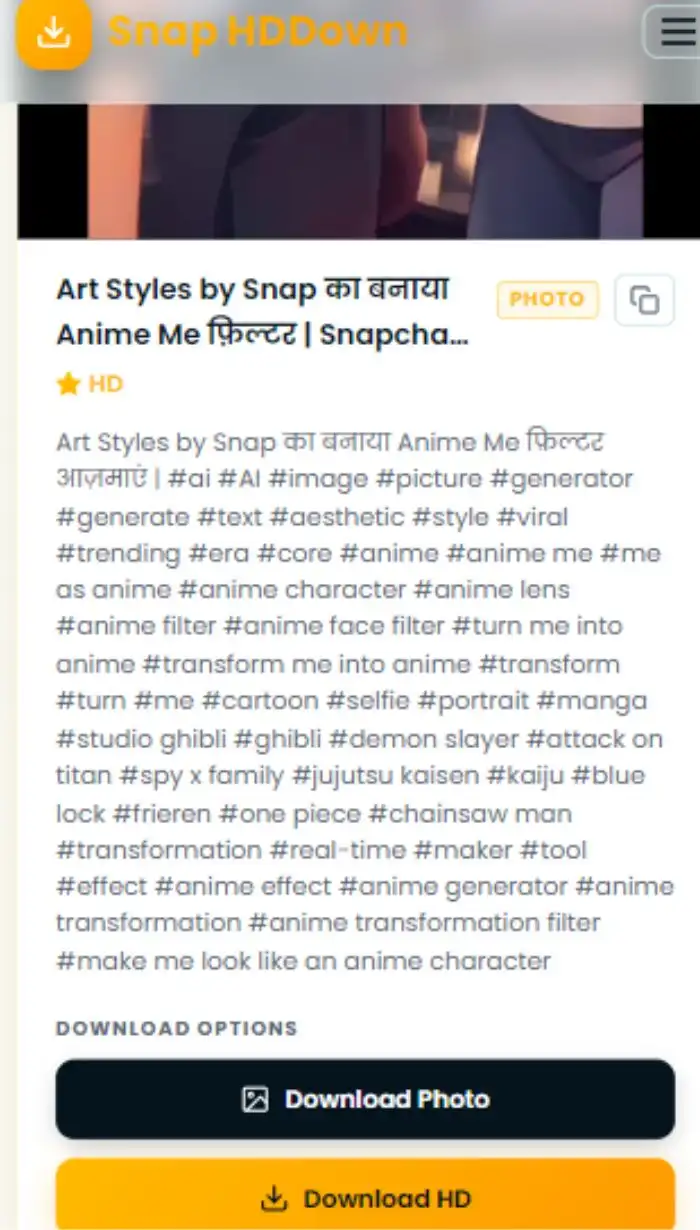
Preview & Save
The full image appears in the result card. Tap Download HD to save the original file to your device — or Download Photo for a standard copy. Both are watermark-free.
After copying the photo link in Snapchat, switch back to this page and tap the clipboard icon in the input field. It auto-pastes your most recently copied URL — no manual paste needed. Then just hit Download Photo. Two taps total.
Why Snap HDDown Delivers Better Photo Downloads
Most photo-grabbing tools either screenshot the web preview (lower resolution, with UI elements) or return a compressed thumbnail. Here is exactly what makes Snap HDDown different for image downloads:
Full-Resolution CDN Image
We resolve the highest-quality version stored on Snapchat's CDN — not the web-preview thumbnail. The downloaded JPEG preserves every pixel at the original upload resolution, which for smartphone photos can be 12 megapixels or higher.
Zero Watermark Architecture
The image file never passes through a processing layer on our servers that could embed a logo. We return the direct CDN URL to your browser, which downloads the file straight from Snapchat — making watermark injection structurally impossible.
Full-Page Image Preview
The result card renders the full image at actual size — not a thumbnail. Zoom in, inspect the detail, verify it is the right photo before committing to the download. What you see in the preview is exactly what you get in the file.
Direct CDN URL Copy
The copy button in the result card puts the raw Snapchat CDN image URL on your clipboard. Feed it directly into Photoshop's Place from URL, Figma, Notion, a Python image pipeline, or any tool accepting a direct image link.
Works on All Devices
The tool runs entirely in your browser — iPhone, iPad, Android tablet or phone, Windows PC, Mac, or Chromebook. No app installation, no platform restriction. Any device with a browser and internet access can download Snapchat photos here.
Server-Side Extraction
Snapchat's photo pages are JavaScript-rendered, which blocks most client-side scraping tools. Our backend handles page rendering and CDN URL resolution on the server — ensuring consistent results regardless of what browser or device you are using.
How to Get a Snapchat Photo Link — Every Scenario
The method for copying a Snapchat photo link changes depending on where the image appears. Here's the complete guide for every surface:
- Open the Snapchat app and go to the Discover or Stories tab
- Tap into a public creator's Story and swipe to the photo Snap
- Tap the Share arrow icon at the bottom
- Select Copy Link from the share sheet
- Open a Spotlight clip — cover photo appears at the start
- Tap the Share button on the right-side panel
- Select Copy Link to get the Spotlight URL
- Paste it here — our tool extracts the cover image
- Open snapchat.com in your browser
- Navigate to a public profile or Story
- Click the photo to open it in full view
- Copy the URL from the browser address bar
Snapchat Photo Format Specs & Editing Compatibility
Before you download a Snapchat photo for a specific project, it's useful to understand the format and resolution specs — especially if you plan to use the image in professional design or editorial work.
Image Format
Snapchat stores and delivers photos primarily as JPEG — the universal standard supported by every device, browser, and editing application. Some images captured in specific modes (like Snap Lens overlays) may be delivered as PNG to preserve transparency layers.
Resolution & Aspect Ratio
Portrait Story photos are typically 1080×1920 (9:16). Profile cover images and some landscape Snaps may be 1920×1080 (16:9). Square Snaps are 1080×1080 (1:1). Original upload resolution varies by device and can reach 12–50 megapixels on modern cameras.
Colour Space
Snapchat photos are encoded in the standard sRGB colour space — the baseline for web display and most print workflows. If you need wide-gamut (P3 or AdobeRGB) output for high-end print, expect a colour management step in your editing application.
Editing Software Compatibility
Downloaded Snapchat photos open natively in Adobe Photoshop, Lightroom, Canva, GIMP, Affinity Photo, Pixelmator, Snapseed, and every other image editor. No format conversion or plugin required — drag the file in and start editing.
Re-Upload Compatibility
Standard JPEG and PNG files are accepted on Instagram, Pinterest, Twitter/X, Facebook, LinkedIn, Behance, and every other image-hosting platform — no conversion or resizing needed. Upload the file directly or import it into a design tool first.
File Size Range
A typical Snapchat photo at full resolution is 500 KB – 8 MB depending on image complexity, JPEG compression level, and original upload resolution. Much lighter than video — you can download dozens without significant storage impact.
Saving Snapchat Photos on Every Device
Photos save differently than videos depending on your operating system. Here is the exact workflow for each platform so you know exactly where your image ends up:
- Paste the photo link and tap Download Photo
- Long-press the image in the result card
- Tap Add to Photos from the contextual menu
- Image saves to Photos → Recents
- Paste the photo link and tap Download Photo
- Tap the Download HD amber button
- Allow the download when your browser prompts
- File saves to Downloads / Gallery
- Paste the photo link and click Download Photo
- Click the Download HD button
- JPEG saves to your Downloads folder automatically
- Right-click the preview image → Save image as… to choose the folder
Who Downloads Snapchat Photos — and Why
The need to save a Snapchat photo spans far beyond personal use. Here are the six most common use cases and the specific workflows each one benefits from:
Journalists & News Writers
Reporters save Snapchat photos as contemporaneous visual evidence for breaking news stories. A downloaded file with an original timestamp is significantly more reliable as editorial evidence than a link that could disappear before the piece goes to press.
Designers & Art Directors
Designers build visual moodboards and inspiration libraries from Snapchat's unique mobile photography aesthetic. Authentic mobile capture — natural lighting, candid composition, unprocessed colour — provides reference material that staged stock photography simply can't replicate.
Content Creators
Creators who lost access to their original photo files — changed devices, deleted camera roll, cloud backup gap — recover their own public Snaps at full quality. No need to re-shoot or accept the low-resolution screenshot alternative.
Brand & Marketing Teams
Marketing professionals save Snapchat photos featuring their products, brand campaigns, or sponsored content — building UGC archives for internal reports, sentiment analysis, pitch decks, and press kits.
Researchers & Academics
Social media researchers studying visual culture, youth communication styles, or platform aesthetics save Snapchat photos as data points for qualitative and visual analysis. Downloaded files are preserved long-term even if the original post is removed.
Personal Archivists
Sometimes a photo shared in a public Story captures a moment you were part of — a concert, an event, a trip — and you want it in your personal archive at full quality, not as a status-bar-cluttered screenshot taken in a rush.
Privacy, Data Handling & Responsible Use
Your privacy and the creator's intellectual property rights both matter. Here is an honest account of exactly how Snap HDDown operates — and what responsible use looks like.
Our Data Commitments
Using Photos Responsibly
Troubleshooting Snapchat Photo Downloads
Every problem has a fix. Here is the complete reference for every error or unexpected result you might encounter when downloading Snapchat photos:
The image may have been removed, the account may have gone private, or you may have pasted a profile URL rather than a specific photo link. Test the URL in an incognito window while signed out of Snapchat — if the photo doesn't load publicly, no external tool can access it.
The link you pasted points to a Snapchat URL that contains video content, not a photo. This is expected — Snapchat sometimes uses identical URL patterns for both. Use our Video Downloader or Spotlight Downloader for video links, and reserve this page for photo-only links.
Snapchat short links (t.snapchat.com/…) are redirects — they are not direct photo addresses. Open the short link in your browser, allow all redirects to complete, then copy the full expanded URL from the address bar before pasting it here.
Safari on iOS handles image downloads differently from desktop browsers. Long-press the image in the result card and select Add to Photos. If that option doesn't appear, tap Download HD and use the iOS share sheet to choose Save Image or Save to Files.
The in-browser preview may load at a compressed resolution for speed. The Download HD button always delivers the highest-quality version stored on Snapchat's CDN. Check the downloaded file directly — it will be full resolution, not the preview compression.
Some browsers open JPEGs in-tab rather than downloading them. Right-click the Download HD button and choose Save link as… to force a file download to your chosen directory. On mobile, long-press the button for the same save option.
Frequently Asked Questions — Snapchat Photo Downloader
Clear answers to the questions we get most often about saving Snapchat photos:
Pro Tips for Downloading Snapchat Photos
Expand Short Links First
Short Snapchat links (t.snapchat.com/…) are redirect wrappers — they are not direct image addresses. Open the link in your browser, wait for it to redirect fully to a snapchat.com/… URL, then copy the expanded address from the bar before pasting here.
Right-Click to Force Save
If clicking Download HD opens the image in a browser tab instead of saving it, right-click (or long-press on mobile) the button and choose Save link as…. This forces your browser to download the file rather than display it inline.
Use the CDN URL in Design Tools
The copy button in the result card gives you the raw Snapchat CDN image URL. Paste it directly into Photoshop's Place Linked dialog, Figma's Image fill, or Notion's inline image embed — skipping the download step entirely for quick reference work.
Download Before the Story Expires
Public Stories disappear after 24 hours. If a photo in a Story catches your attention, download it immediately — even if you are not sure you need it yet. A link to an expired Story is worthless; the downloaded file is yours permanently.
Verify Public Access in Incognito
Open the Snapchat photo link in an incognito or private window while signed out. If the image loads without a login prompt, our tool can fetch it. If Snapchat asks you to sign in, the content is restricted and cannot be downloaded externally.
Use Clipboard Auto-Paste
Copy the photo link in Snapchat, switch to this page, and immediately tap the clipboard icon beside the input field — it auto-pastes your most recent clipboard content. Then tap Download Photo. The entire process is two taps after the initial copy.
All Snapchat Downloaders on Snap HDDown
Snap HDDown covers every type of public Snapchat content — each with a dedicated page tuned to that specific format and use case:
All Snapchat Videos
The main downloader handles any public Snapchat video URL and auto-detects the content type.
Main DownloaderPublic Stories
Save photo and video Snaps from public creator and brand Stories before they expire in 24 hours.
Stories DownloaderSpotlight Videos
Download viral short-form videos from Snapchat's algorithm-driven Spotlight discovery feed in HD.
Spotlight DownloaderSnapchat Reels
Save short public Snap clips in 1080p — editor-ready H.264 MP4 files with no watermark.
Reels DownloaderProfile Photos (DP)
Download full-resolution display pictures from any public Snapchat user profile in one click.
DP DownloaderVideo Thumbnails
Save the cover frame from any Snapchat video as a full-resolution JPEG — no screenshotting needed.
Thumbnail DownloaderReady to Save Your First Snapchat Photo?
Scroll up, paste any public Snapchat photo link, and get the original full-resolution JPEG on your device in under 3 seconds — no watermark, no account, no limits. The cleanest Snapchat photo download tool on the web, free forever.